
Writing Custom Effects
Ghost Arcade ships with 200+ built-in post-processing effects, and you can drop in your own. A custom effect is a single .dmfx.json file containing the shader source, the parameter definitions, and a bit of metadata. Import it from the Effect Picker and it appears in the “Custom” category alongside the built-ins.
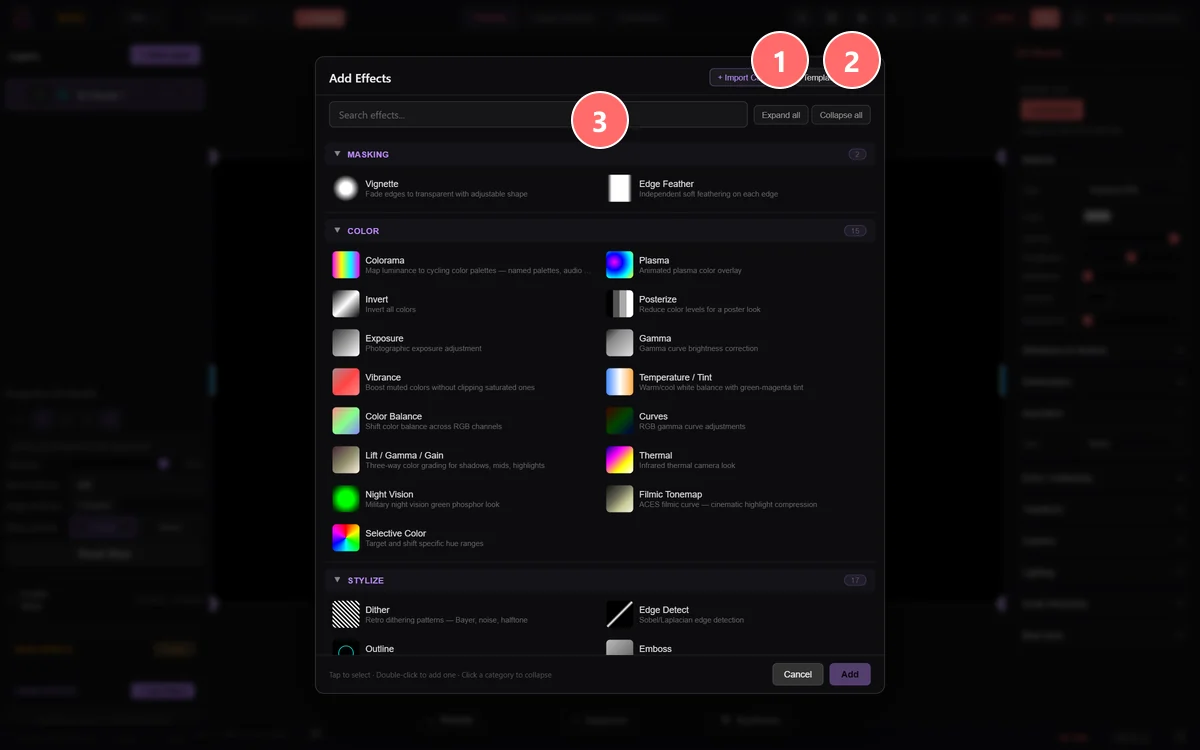
- 1+ Import Custom — load a user-supplied .dmfx.json plugin manifest. Custom effects can mix GLSL + JS and ship their own parameter UI.
- 2Template — generates a blank .dmfx.json you can edit inline (parameter definitions, GLSL body, JS prep code).
- 3Search effects — same modal as the standard Add Effect picker; once you import a custom, it appears in its own section like any other category.
custom-effects.md
Hand this file to Claude or ChatGPT and it will author effects that fit our runtime — catalog entry, param defs, shader, and the 10 defensive-programming rules distilled from auditing the built-in effect library.
Download skill ↓my-custom-effect.dmfx.json
A working template with two parameters and a tint shader you can modify. Also available inside the app via Add Effect → Template.
Download template ↓What's in the file
A .dmfx.json is a single JSON envelope with five required sections. Here's the template you get from the Template button:
{
  "version": 1,
  "type": "my-custom-effect",
  "label": "My Custom Effect",
  "category": "Stylize",
  "description": "What this effect does, in one sentence.",
  "author": "Your Name",
  "previewCSS": "linear-gradient(45deg, #f0f, #0ff)",
  "params": [
    { "param": "uAmount", "name": "Intensity",
      "type": "slider", "min": 0, "max": 1, "default": 0.5, "step": 0.01 },
    { "param": "uColor",  "name": "Tint",
      "type": "color",  "default": [1, 0.5, 0.2, 1] }
  ],
  "shader": "precision highp float;\nuniform sampler2D uTexture;\n..."
}version— currently1. The runtime uses this to evolve the format safely in the future.type— a unique identifier (letters, digits, hyphens, underscores). Can't collide with a built-in effect.label,category,description,previewCSS— everything the picker needs to display your effect.params— the slider / color controls. Eachparamname must match a uniform declared in your shader.shader— the fragment shader source as a string. Must declareuniform sampler2D uTexture,varying vec2 vUv, write togl_FragColor, and contain avoid main().
The shader skeleton
Effects are post-processing passes. Your shader receives the layer's current texture as uTexture and writes a modified version. The runtime also gives you uResolution (output size) and uTime (seconds since start), plus any custom uniforms you declare in params.
precision highp float;

uniform sampler2D uTexture;
uniform vec2 uResolution;
uniform float uTime;
uniform float uAmount;
uniform vec3 uColor;
varying vec2 vUv;

void main() {
  vec4 src = texture2D(uTexture, vUv);
  vec3 tinted = mix(src.rgb, src.rgb * uColor, uAmount);
  gl_FragColor = vec4(clamp(tinted, 0.0, 1.0), src.a);
}
The rules every shipping effect follows
We audited every built-in effect. These are the defensive-programming patterns we ship and expect from imports:
- Guard every divisor by a uniform. If your slider can sit at zero,
1.0 / uAmountgoes to infinity. Usemax(uAmount, 0.05). - Never normalize a zero vector. At the exact center pixel,
normalize(uv - 0.5)is NaN. Usenormalize((uv - 0.5) + vec2(1e-6))or a branch on distance. - Clamp the base of every pow().
pow(max(x, 0.0), n)— fractional exponents on negative numbers are undefined. - Const loop bounds. WebGL 1 forbids runtime loop bounds. Write
for (int i = 0; i < 32; i++)and early-exit withif (i >= steps) break. - Clamp sample UVs. If you compute a
sampleUvthat can fall outside [0,1], wrap it inclamp(…, 0.0, 1.0)beforetexture2Dor you'll see seam artifacts on the screen edge.
Importing into the app
Once your .dmfx.json file is ready:
- On any layer, click + Add Effect.
- In the top-right of the Effect Picker, click + Import Custom.
- Select your file. The app validates the JSON shape and the shader's required uniforms before accepting it.
- The effect appears in the Custom category with a purple badge. Double-click to apply to the current layer.
- To remove an imported effect, hover the row in the picker and click the × in the corner.
Imported effects persist across app restarts (stored in your browser's localStorage, not cloud-synced). If you want to share an effect, just send the .dmfx.json file.
Performance: effects chain
A layer can have many effects, and they run as a chain of full-screen passes. Five chained effects at 1080p = five times the per-pixel work per frame. Keep each effect cheap:
- Recolor / threshold (brightness, posterize, tint) — ≤ 30 ops/pixel.
- Convolution (blur, sharpen, edge-detect) — ≤ 9 texture reads. Separable blur when radius > 4.
- Distortion / warp (wave, fisheye, kaleidoscope) — ≤ 2 texture reads.
- Multi-sample (bloom, god rays) — cap the inner loop at 16 samples.