
Writing Custom Shaders
Every layer in Ghost Arcade can play a custom .fs fragment shader as its content source. Shaders are written in GLSL with the ISF (Interactive Shader Format) header on top, giving you a metadata block that tells the app what UI controls to build. This page covers the file format, the defensive-programming rules that every shipped shader follows, and how to get your shader into the library — including the built-in AI generator that lets you describe a shader in plain English and get back working GLSL.
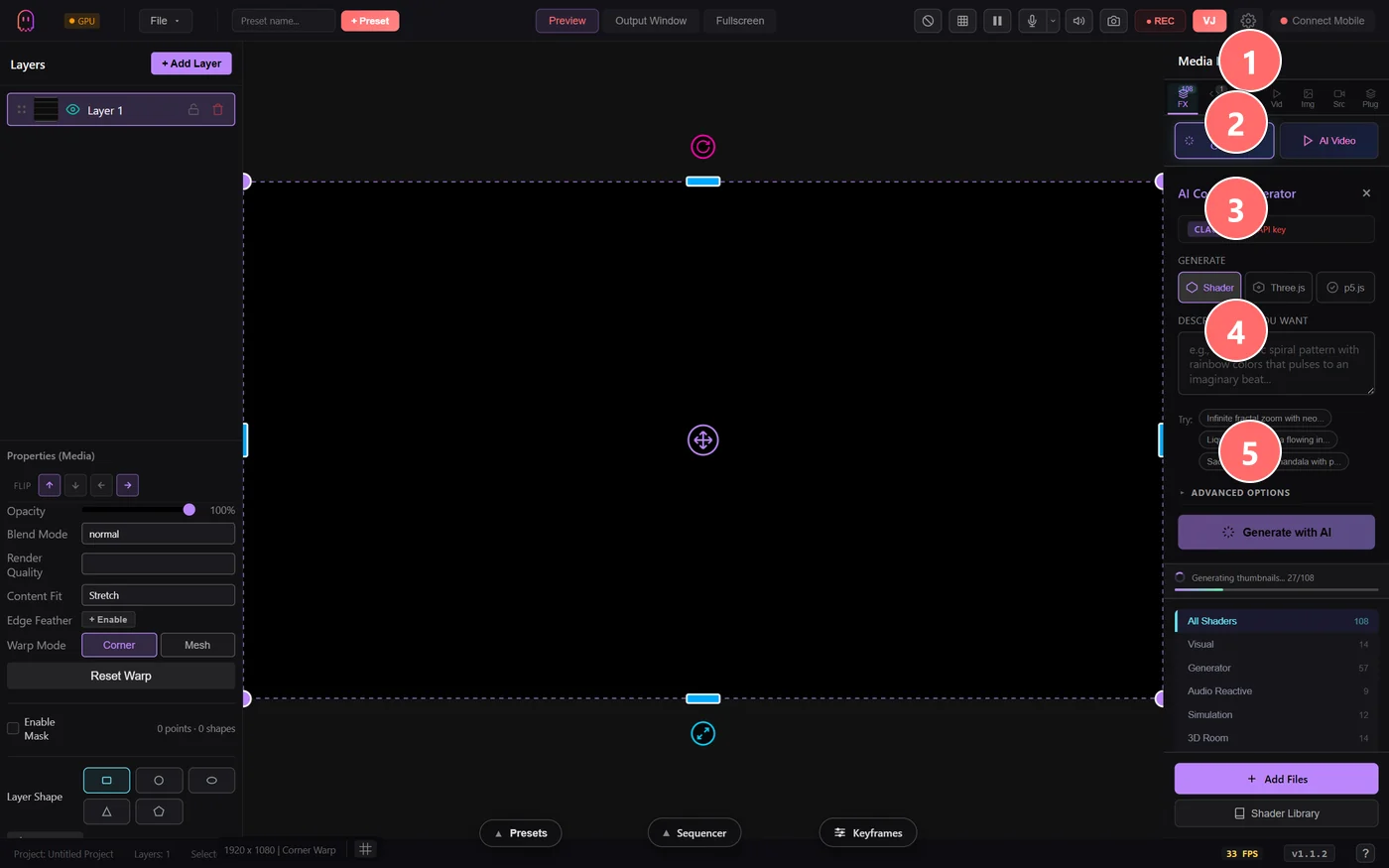
- 1AI Content Generator — opens from the AI Generate button on the Media Library FX tab.
- 2Mode tabs — Shader (GLSL fragment shader), Time.js (procedural JS animation), or .glsl direct paste. The output is wired into a new layer’s shader slot.
- 3Describe what you want — natural-language prompt. Be specific about visual style, motion, palette, and any audio reactivity hooks.
- 4Example prompts — click to populate the prompt field with a known-good example so you can iterate from there.
- 5Generate with AI — calls your configured provider (Claude / Gemini / Replicate) using a BYO API key. The returned shader compiles inline; errors surface as red toasts you can fix and retry.
shader-authoring.md
Hand this file to Claude or ChatGPT and it will write shaders that match our conventions — ISF header, audio uniforms, the seamless atan2 fix, performance budget, and a pre-ship checklist. Distilled from auditing every default shader we ship.
File format
A shader is a plain text file with the extension .fs. The first lines are a JSON metadata block inside a GLSL comment, followed by the fragment shader source. Drop the file into the app's shader library and the metadata becomes slider controls.
/*{
  "CREDIT": "Your Name",
  "DESCRIPTION": "What the shader renders, in one sentence",
  "ISFVSN": "2.0",
  "CATEGORIES": ["Generator"],
  "INPUTS": [
    {"NAME": "speed", "TYPE": "float", "MIN": 0.0, "MAX": 3.0, "DEFAULT": 1.0, "LABEL": "Speed"},
    {"NAME": "tint", "TYPE": "color", "DEFAULT": [0.4, 0.7, 1.0, 1.0], "LABEL": "Tint"}
  ]
}*/

#ifdef GL_ES
precision highp float;
#endif

void main() {
    vec2 uv = (gl_FragCoord.xy - 0.5 * RENDERSIZE) / RENDERSIZE.y;
    vec3 col = vec3(0.0);
    // ...your shader here...
    gl_FragColor = vec4(col * tint.rgb, 1.0);
}
Built-in uniforms
The runtime injects these automatically — you don't declare them:
RENDERSIZE— output resolution in pixels (vec2).TIME— seconds since start (float).TIMEDELTA,FRAMEINDEX,DATE— time bookkeeping.isf_FragNormCoord— UV in [0,1] (alternative to dividinggl_FragCoord.xyby RENDERSIZE).
For audio-reactive shaders, you also get audioLevel, audioBass, audioMid, audioHigh, audioBeat, sampleFFT(u), and sampleWaveform(u). If your shader reads any of these, set its CATEGORIES to include "Audio Reactive" so users can find it.
The five pitfalls that break shipped shaders
We audited every default shader in the library. These are the bug classes we found — and what to write instead:
1. The atan2 seam
atan(y, x) jumps by 2π across the negative x-axis. If you feed angle / PI into a fractal / voronoi / noise function, every pixel on that ray gets a different coordinate and you see a horizontal seam on the left side of the screen.
Embed the angle on a cylinder instead — cos/sin is C∞ at the boundary:
// BAD — visible seam
tunnelUV = vec2(angle / PI, z);

// GOOD — seamless cylinder embedding
tunnelUV = vec2(cos(angle), sin(angle) + z);
2. Division by a uniform that can hit zero
Sliders with MIN = 0 will eventually sit at zero. Without a clamp you get NaN or Infinity and a flashing ring somewhere in the image.
// GOOD — floor the denominator
c *= 0.2 / max(abs(dd), 0.05);
temp = pow(temp, 1.0 / max(uIntensity, 0.05));
3. Oversampled parametric curves
Torus knots, Moebius strips, oscilloscopes — 100–150 samples render identically to 400 for continuous curves. Default SAMPLES to 128, not 400. You cut per-pixel cost by 2–3× with no visual change.
4. Shadowed built-ins and dead variables
Never name a local dot, mix, length, cos, or reflect — you'll shadow the GLSL built-in and the next edit will silently break. And delete dead code; we found one default shader with four consecutive assignments to a local variable where only the last one was used.
5. Runtime loop bounds
WebGL 1 requires for loop bounds to be compile-time constants. Use a const cap plus an early break:
// GOOD — const upper bound, runtime early-exit
for (int i = 0; i < 30; i++) {
  if (i >= nodeCount) break;
  // ...
}
Performance budget
Target 60 fps at 1080p on a mid-range integrated GPU — that's ~16 ms per frame. Rough per-pixel budgets that stay under the ceiling:
- 2D generators (grids, plasma, voronoi) — ≤ 200 ops per pixel.
- Particle systems — N particles × constant inner loop; aim ≤ 1k ops total.
- Raymarched 3D SDFs — ≤ 60 march steps × ≤ 6 SDF primitives.
Using your custom shader
The default shader library is curated by the Ghost Arcade team — but Ghost Arcade is open-source, so you can contribute upstream, and you can always use your own shaders in your own projects right alongside the built-in library. They live in your project's Media Tray, so your work travels with the project file.
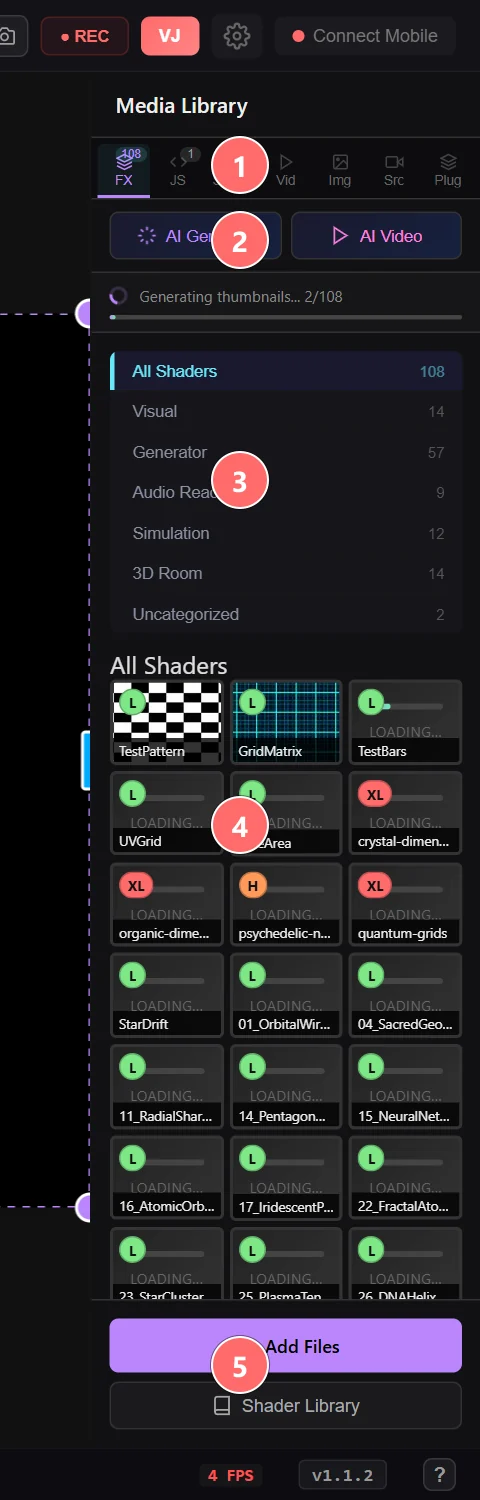
- 1FX tab — the shader browser, separate from JS / Saved / Vid / Img / Src / Plug tabs.
- 2AI Generate / AI Video — generative entry points (shaders + Luma clips, BYO keys).
- 3Categories — filter the catalog by Visual, Generator, Audio Reactive, Simulation, 3D Room, Uncategorized, or your own My Library.
- 4Shader thumbnails — drop your own .fs / .frag files into this grid and they’ll render inline. L / H / XL badges indicate GPU cost.
- 5+ Add Files — open a file picker to import GLSL, ISF, or HLSL shaders from disk. Files are copied to the project’s shader directory.
- In the Media Tray, click Add Files at the bottom.
- Pick one or more
.fsor.isffiles. - They appear under the Shaders tab in the tray. Drag one onto a layer — or double-click — to apply it, then tweak the sliders the ISF header declared.
- Save the project (File → Save). Your custom shaders are embedded in the project file; reopening or sharing the project keeps them intact.
If you've written something that deserves a wider audience, we'd love to see it — open a PR against the open-source repo or share via the community forums.