
Effects Pipeline
Ghost Arcade includes 200+ real-time visual effects across 20 categories. Effects are applied per-layer through a drag-and-drop chain system that lets you build complex visual treatments by combining simple, focused effects in sequence.
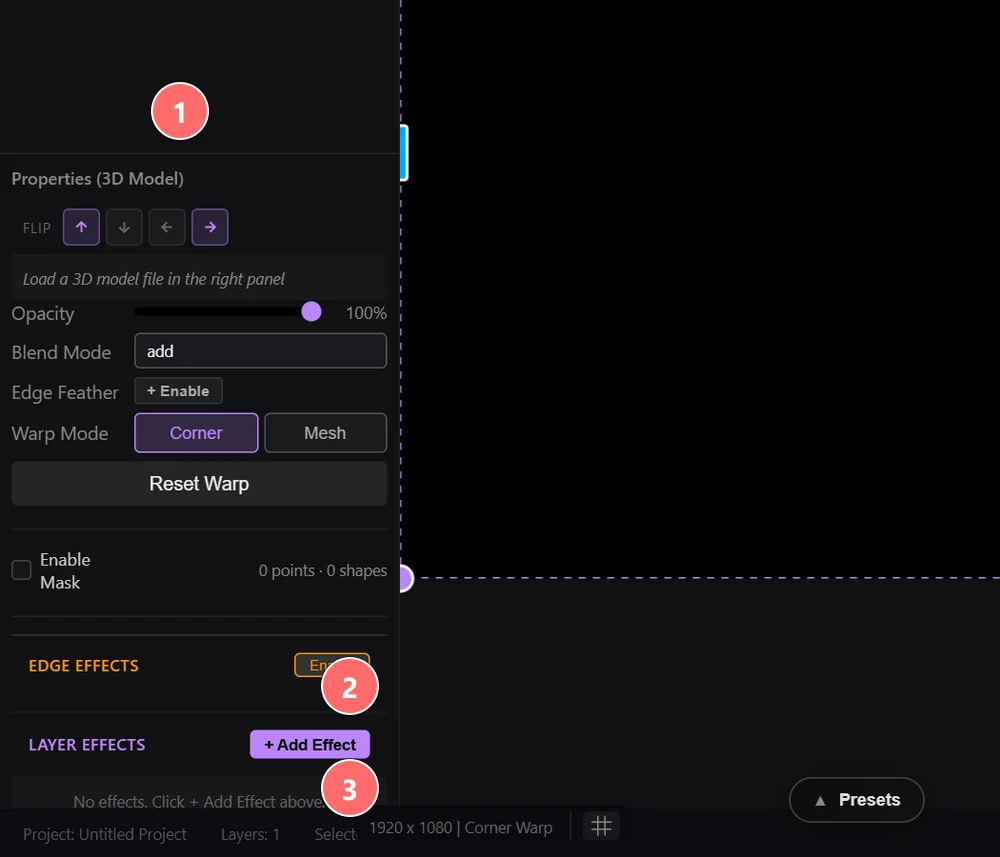
- 1Properties (Layer Type) — effects are configured inside each layer’s properties panel.
- 2EDGE EFFECTS — runs on the layer’s edge (feather, vignette). Enable toggles the whole section.
- 3LAYER EFFECTS — main effect chain. Click + Add Effect to open the effect picker; effects render top-to-bottom (top runs first).
How Effects Work
Every layer in Ghost Arcade has its own independent effect chain. To add an effect, open the effects panel for a layer and browse or search the effect library. Click an effect to add it to the bottom of the chain. Each effect in the chain processes the output of the one above it, so order matters.
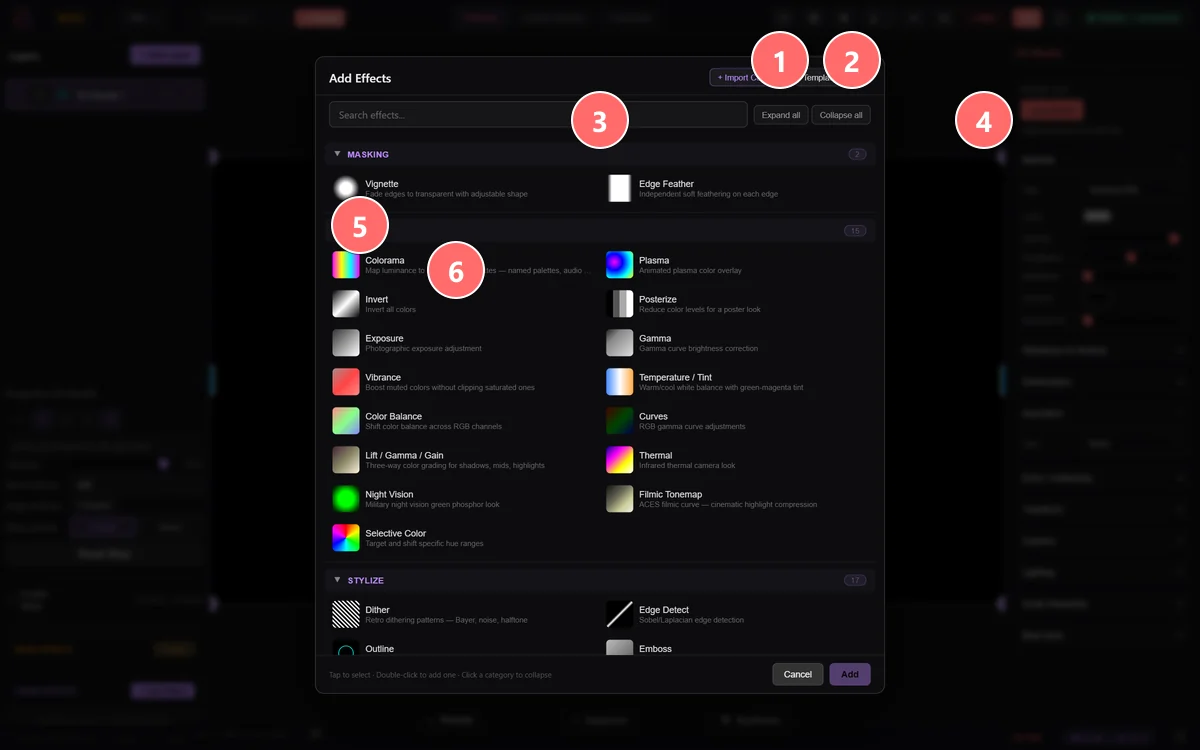
- 1+ Import Custom — load a user-supplied .dmfx.json plugin effect from disk.
- 2Template — start from a blank custom effect template you can edit inline.
- 3Search effects — filter the full catalog by name as you type.
- 4Expand all / Collapse all — open or close every category section at once.
- 5Category header — each section groups related effects (Masking, Color, Stylize, Blur & Focus, Light & Glow, Distort, Keying, Geometric 3D, plus nine Advanced packs and WebGPU).
- 6Effect tile — click any effect to add it to the active layer’s chain. Hover for a one-line description.
Reorder effects by dragging them up or down in the chain. The layer content enters at the top, passes through each effect from top to bottom, and the final result is what appears on the canvas. This sequential processing means you can get very different results by rearranging the same set of effects.
Each effect has its own parameter controls that appear when you expand it in the chain. Parameters are specific to each effect type and update in real time as you adjust them. Every effect also shares a common set of controls for mix level and bypass.
Common Effect Parameters
While each effect has unique parameters, every effect in the chain shares these standard controls:
- Mix / Intensity — Controls how strongly the effect is applied, from 0 (no effect, original image passes through) to 1 (full effect). This lets you dial in subtle treatments or blend between the processed and unprocessed signal.
- Bypass Toggle — Temporarily disables the effect without removing it from the chain. The effect is skipped during processing but retains all its parameter values. Useful for A/B comparison to see what a specific effect contributes to the overall look.
- Parameter Ranges — All numeric parameters have defined minimum and maximum values displayed alongside their sliders. Hover over a parameter name to see its range and default value. Double-click a slider to reset it to the default.
Effect Categories
The 200+ effects are organized into categories. The effect browser lets you filter by category or search by name.
Masking
Constrain a layer’s visible area or feather its borders. The two most common edge-shaping effects ship as a dedicated category so they’re always one click away.
Color
Shape the color and tone of a layer. Spans corrective tools (exposure, white balance, curves, lift/gamma/gain) and stylistic tools (Colorama, Plasma, Thermal, Night Vision) all the way through to filmic tonemapping and selective color isolation.
Stylize
Transform layers into graphic or painterly styles. Includes hand-drawn looks (Outline, Toon, Watercolor), print/retro (Halftone, VHS, Scanlines), and analog glitch (RGB Shift, Datamosh-style corruption).
Blur & Focus
Soften, smear, sharpen, and defocus. Gaussian, motion, and zoom blur are joined by a tilt-shift miniature effect and bokeh that simulates aperture-shape highlights.
Light & Glow
Add luminous atmosphere and cinema-lens artifacts. Bloom bleeds highlights, god rays cast volumetric shafts, halation and anamorphic streaks simulate film and anamorphic lens flares.
Generate & Texture
Overlay procedural texture and atmosphere. Film grain and noise mix into the signal, heat haze adds shimmering distortion, CRT layers in retro display artifacts.
Distort
Bend and warp pixel space. Kaleidoscope reflects into symmetric segments, displacement uses a source map to push pixels, fisheye/lens-distortion apply lens-shape curvature.
Keying
Remove backgrounds and refine mattes. Chroma key removes green/blue screens with adjustable tolerance and spill suppression; erode/dilate clean up edges of the resulting matte.
Geometric 3D
Hero-quality 3D shape projections of the source layer, rendered with analytic ray-primitive intersects so they stay GPU-friendly at performance frame rates.
New Hero
The newest generation of standalone hero effects — each is a full-screen treatment substantial enough to anchor a layer on its own.
Advanced 3D
Project the layer onto explicit 3D geometry (sphere, cube, cylinder, torus, terrain, diamond facets) or shatter it into volumetric pieces. Camera, lighting, and material parameters animate per-effect.
Advanced Atmosphere
Volumetric atmosphere layered over the source — fog with depth, particle weather, relighting, and starburst glints anchored to bright pixels.
Advanced Color
Color correction tools borrowed from grading suites: false-color exposure visualization, shadow recovery, and highlight roll-off for clean exposure rescues.
Advanced Depth
Pseudo-depth effects that turn a flat layer into a tunnel, an infinite mirror corridor, or a refractive crystal pass.
Advanced Feedback
Recursive feedback with zoom and rotation. Generates infinite tunnel and fractal-like patterns by routing the output back into the input each frame.
Advanced Stylize
Heavier stylization passes: ASCII art replacement, comic-style inking, mpeg-style compression artifacts, datamosh, and analog tape damage.
Advanced Text & Pattern
Replace pixels with text, pattern grids, or material textures — matrix rain overlays, circuit-board traces, stained glass, mosaic tiles, neon outline shapes.
Advanced Trails
Long-exposure-style time effects. Trail and echo modes accumulate motion over frames; chronophotography stacks discrete frame snapshots for stroboscopic motion studies.
Advanced Warp
Heavier spatial deformations: ripple caustics, expanding shockwaves, Droste recursion, slit-scan time-displacement, fluid-sim distortion, and wormhole warp.
WebGPU
GPU-native effects that run on the WebGPU path. The 2D Fluid Sim ships here; more WebGPU effects will land as the GPU rendering path stabilises.
Tips for Working with Effects
- Effects stack across layers. The final composite is built from all visible layers, each with their own effect chain. You can split complex looks across multiple layers instead of piling everything onto one chain.
- Use bypass to A/B test. Toggle individual effects on and off to hear what each one contributes. This is the fastest way to understand how your chain is shaping the final output.
- Keep chains short for performance. Every effect in the chain adds a render pass. For live performance at 60fps, aim for 3–5 effects per layer. If you need more complexity, distribute effects across multiple layers.
- Combine subtle effects for complex looks. Instead of pushing a single effect to extremes, layer several effects at low mix values. A touch of film grain, a gentle vignette, and a slight color shift together create more nuanced results than any one effect at full intensity.
- Order matters. Applying blur before edge detect produces soft outlines. Applying edge detect before blur produces smeared lines. Experiment with reordering to discover new looks from the same set of effects.
- Feedback and trails are GPU-intensive. Effects in the Feedback and Trails categories maintain frame buffers over time. They produce stunning results but consume more memory than single-frame effects. Use one or two per composition at most during live performance.