
SynthVision (Performer Mode)
SynthVision turns your keyboard into a visual instrument. Up to 36 slots across the number, Q, A, and Z rows let you map any visual content to individual keys and perform live, triggering visuals instantly with keypresses. Combine the QWERTY clip pad with an XY pad, spacebar effects, a palette of 3D worlds, and one-shot action macros to build layered compositions on the fly, save complete keyboard configurations as presets, and recall different setups for different songs or segments of your set.
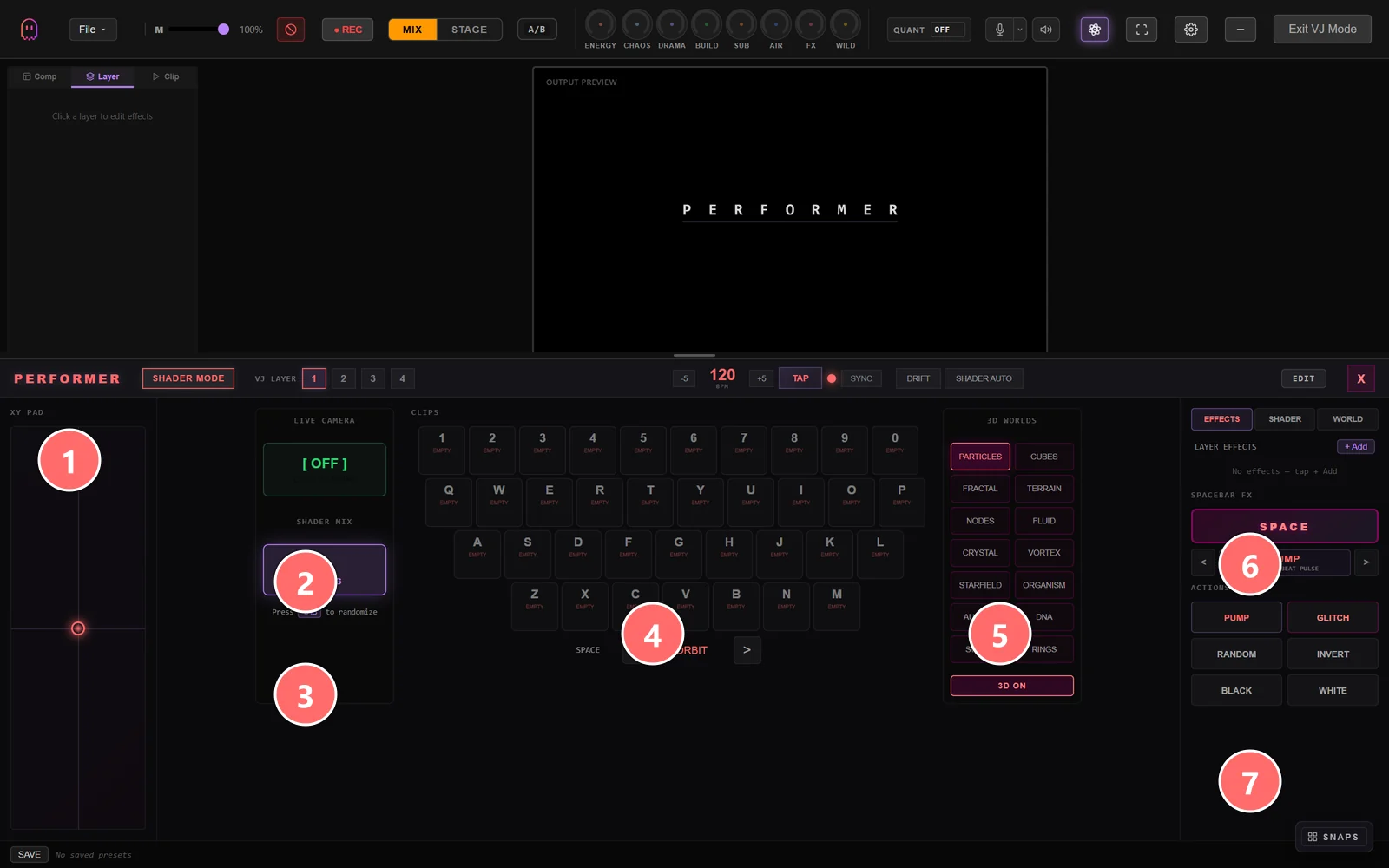
- 1XY Pad — drag the dot to modulate two macro parameters at once (mapped to the layer that’s currently the focus of Performer).
- 2Live Camera — toggle a webcam input as a live source for shader effects.
- 3Shader Mix — current shader-blend curve; press a key to randomize, hold to scrub.
- 4QWERTY clip pad — every letter key triggers a clip. Number row 1–0 maps to slots 1–10, Q-row to 11–20, A-row to 21–29, Z-row to 30–36 (36 slots total across the four rows).
- 53D Worlds palette — pre-built 3D environments (Particles, Cubes, Fractal, Terrain, Nodes, Fluid, Crystal, Vortex, Starfield, Organism, etc.). Click to load as a layer.
- 6Spacebar FX + Layer Effects — assign an effect to the Space key for momentary triggers; the EFFECTS / SHADER / WORLD tabs above choose which target the spacebar acts on.
- 7Actions — one-shot macros (PUMP / GLITCH / RANDOM / INVERT / BLACK / WHITE) that fire on click and reset.
The Keyboard Grid
The Performer interface maps directly to four rows of your physical keyboard, giving you 36 total slots for visual content:
Each slot can hold any layer type — ISF shaders, media files, 3D models, gaussian splats, text, colors, or any other content Ghost Arcade supports. The grid mirrors the physical layout of your keyboard so muscle memory translates directly to visual performance.
Assigning Content
To populate your keyboard grid, enter edit mode and assign content to individual key slots:
- Enter edit mode using the edit toggle in the Performer header.
- Click any key slot in the grid to open the content assignment panel.
- Choose a content type — shader, media, 3D model, splat, text, color, or any supported layer.
- Configure parameters for that content. Each type has its own set of controls (colors, speeds, transforms, effects, etc.).
- Exit edit mode when finished. The slot is now ready for performance.
To clear a slot, right-click it while in edit mode. The assignment is removed and the key returns to an empty state.
Performance Mode
Outside of edit mode, Performer is in performance mode. This is where the instrument comes alive:
- Press any assigned key to trigger its visual content instantly. There is no latency — content renders on the next frame.
- Layer multiple keys by pressing several at once. Active visuals composite together, letting you build complex scenes from simple building blocks.
- Release a key to remove that layer from the composition. The visual disappears and the canvas updates immediately.
- Full-screen output can be sent to a projector or secondary display while you perform from the Performer interface on your primary screen.
Performance mode is designed for stage use. The keyboard becomes a tactile, zero-latency controller for layered visual compositions.
Keyboard Presets
A keyboard preset stores the complete state of all 36 key assignments — every content type, every parameter, every configuration. Presets let you prepare different keyboard layouts ahead of time and switch between them during a show.
- Save a preset to capture your current keyboard configuration. Give it a descriptive name so you can find it quickly during a set.
- Load a preset to recall a saved configuration. All 36 slots update at once, ready for performance.
- Presets are stored locally in your browser’s localStorage, so they persist between sessions on the same machine.
- RESET button — visible in edit mode — clears all 36 key assignments at once, giving you a blank keyboard to start fresh.
Build a preset for each song, each set segment, or each venue. When it’s time to transition, load the next preset and keep performing.
36 Built-in Performer Shaders
Performer ships with a curated collection of 36 ISF shaders, one for each key slot, pre-loaded and optimized for live performance triggering. These shaders are designed to look good together — they share compatible color palettes and visual weights so layering any combination produces cohesive results.
The built-in collection covers a wide range of visual styles: geometric patterns, organic flows, particle systems, color fields, rhythmic pulses, and abstract textures. Use them as-is for instant performance capability, or replace individual slots with your own content as you develop your visual vocabulary.
Tips
- Organize by vibe. Put warm-toned visuals (reds, oranges, yellows) on the left side of the keyboard and cool tones (blues, purples, greens) on the right. Your hands will instinctively reach for the right region during a performance.
- Use adjacent keys for complementary content. Place visuals that look good layered together on neighboring keys. When you need a quick two-layer composition, adjacent fingers are the fastest reach.
- Dedicate a row to a purpose. For example: number row for backgrounds, Q-row for mid-layer effects, A-row for foreground elements, Z-row for accent flashes and transitions.
- Build presets per set segment. If your DJ set moves through genres or energy levels, create a preset for each phase. Load the ambient preset for the opener, switch to the high-energy preset for the peak, and drop into the minimal preset for the cooldown.
- Practice your transitions. The keyboard is an instrument. Spend time learning which combinations work and developing muscle memory for your most-used visual phrases.
- Keep a few slots empty. Not every key needs an assignment. Empty slots give you breathing room and prevent accidental triggers when your fingers land on unexpected keys.