Layer Types
Ghost Arcade builds every composition out of layers. Each layer renders a different kind of visual content, and they stack from top to bottom in the layer panel — the top entry composites over everything below it. Every layer type shares a common set of properties (opacity, blend mode, visibility, effects chain, warp controls) while exposing its own specialized parameters.
The Add Layer dropdown offers eleven entry points, in this order: Media Layer, Custom Shape, Lines Layer, SVG Layer, Light Painting, Text Layer, Splat / Point Cloud, 3D Model, GPU Shader (WebGPU), Screen (VJ Output), and Group. Each section below documents one of these in the same order.
Shaders are content for Media and GPU Shader layers (loaded from the FX tab of the Media Library), not a layer type of their own. Imported videos, images, screen captures, and Three.js / p5.js animations are also content for Media layers.
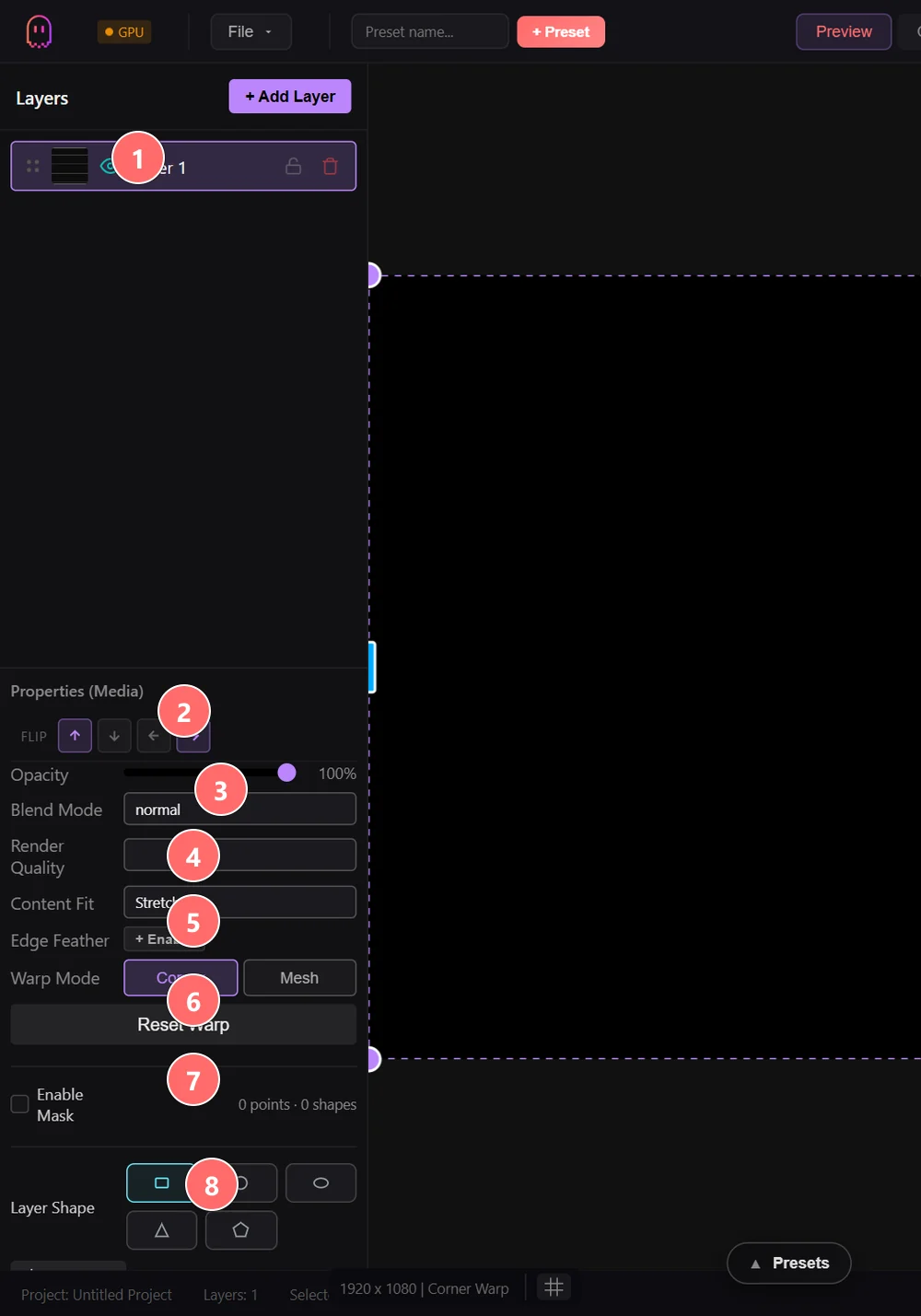
- 1Layer card — visibility eye, lock, delete, drag-handle on the left for reordering. Active layer is highlighted purple.
- 2Properties (Layer Type) — the panel’s title shows which layer type is selected; the controls below adapt to the type.
- 3Flip buttons — flip the layer’s source content vertically or horizontally without changing geometry.
- 4Opacity — global layer alpha (0–100%) applied before the blend mode.
- 5Blend Mode — how the layer composites with everything below it. 26 modes from Normal/Add/Multiply/Screen through Vivid Light and Pin Light.
- 6Content Fit — how the source content fills the layer rectangle: Stretch, Fill, or Crop.
- 7Warp Mode — Corners (4-point perspective), Mesh (grid of control points), Edge (soft edge blending), or None. Reset Warp returns to the canvas rectangle.
- 8Mask + Layer Shape — enable a polygon mask, or constrain the layer to a primitive shape (rectangle, circle, ellipse, triangle, polygon, star, line, polyline, or custom).
On this page
Media
The everyday layer. A Media layer is a rectangle on the canvas that can hold almost any kind of source: an ISF/GLSL shader, an imported video, an image, a JavaScript animation (Three.js or p5.js), a solid color or gradient, or an AI-generated clip. You pick the source from the Media Library on the right; the layer renders whatever you assign.
The headline source type is the built-in shader library: 200+ ready-to-use GLSL/ISF fragment shaders across Visual, Generator, Audio Reactive, Simulation, and 3D Room categories. Each shader exposes its ISF parameters as automatically-built UI controls — floats become sliders, color uniforms become color pickers, long types become dropdowns. Every parameter is MIDI-mappable and can be driven by audio reactivity or LFO modulation.
For video and image content, supported formats include MP4, MOV, WebM, GIF, PNG, and JPG. Media layers have playback controls (speed, loop / ping-pong / play-once, in/out trim, frame-accurate scrubbing) and a built-in chroma keyer for green/blue/custom-color removal directly on the layer.
See the Custom Shaders guide for the ISF authoring rules and the built-in AI shader generator.
Custom Shape
A Media layer that ships with a freely-editable polygon outline instead of the default rectangle. Add a Custom Shape from the dropdown and you get the same source choices as a Media layer (shader, video, image, JS animation, color), but the rendered content is clipped to a polygon you draw and reshape directly on the canvas.
Custom Shape is the fastest path to projection-mapping irregular surfaces: trace a building edge, a sculpture, a window frame, or a stage element with anchor points and the layer fills that exact contour. Add or remove anchors, drag them in real time, and the source content reflows into the new outline. Combine with per-layer warp for finer alignment.
The same primitive-shape options available on standard Media layers (rectangle, circle, ellipse, triangle, polygon, star, line, polyline) also live under Layer Shape in the properties panel, if you just need a regular geometric mask instead of a freeform outline.
Lines
Draw directly on the canvas using freehand or point-click modes. Lines layers are essential for projection mapping — trace the edges of a building, stage element, or sculpture, then animate the strokes to bring the surface to life.
Each path is a first-class object with its own stroke style, color, and animation. Stroke effects transform simple lines into dynamic visuals: glow, neon, snake (animated crawling segment), laser, pipe (3D-shaded cylinder), electric, fire, smoke, dash, dot, gradient, rainbow, taper, and others.
Progress-based draw animation reveals the stroke over time — perfect for tracing architectural edges in projection mapping or building up stage line work during a performance. Control draw speed, easing, direction, and loop behavior. Paths can also be edited point-by-point after they are drawn.
SVG
Import SVG vector files and bring them to life with animated fills and edge effects. SVG layers preserve the crisp, resolution-independent quality of vector art while adding dynamic motion that would be impossible in a static file.
Fill modes control how SVG shapes are colored: solid, gradient (linear / radial / angular with customizable color stops), shimmer, liquid, noise, pattern, and animated texture. Stroke and fill can be animated independently of one another.
SVG-specific edge and fill effects operate on the vector paths themselves: edge particles emitted along outlines, energy pulses travelling along paths, procedural lightning between path nodes, plasma fills that animate within shape boundaries, and connection lines linking SVG elements together. Per-element warp (in the projection-mapping panel) lets you map each SVG shape to a different physical surface within one layer.
Light Painting
A freeform drawing tool that simulates long-exposure light painting. Unlike the Lines layer (which produces structured paths with explicit endpoints), Light Painting creates expressive, organic trails with physics-based brush behavior, including pen-pressure response on supported tablets and Apple Pencil.
Brush types include glow, neon, flame, electric, ribbon, particle, smoke, laser, watercolor, ink, splatter, aurora, and crystal — each with its own visual character. Trail and persistence controls govern how long painted strokes linger (afterglow duration, bloom radius), and an echo mode generates time-delayed duplicates of your strokes for layered effects.
Light Painting layers work especially well as overlays on top of other content, or as the primary layer for performances that lean on improvised drawing with a tablet or the mobile companion app.
Text
Render text with full typographic control and animated presentation. Text layers support any installed system font, custom font loading, stroke outlines, drop shadows, and per-character animation.
Animation modes for dynamic typography include typewriter, wave, glitch, rainbow, matrix rain, elastic, spiral, explode, fade, bounce, shake, rotate, scale pulse, slide, flip, scramble, neon flicker, and 3D spin. Combine with the standard per-layer effects chain for further treatment.
Text can be extruded into 3D geometry with adjustable depth, bevel size, and bevel segments. 3D text receives dynamic lighting and can be rotated on all three axes, and material overrides let you give it a metallic, glass, or neon-lit look without leaving the layer.
Splat / Point Cloud
Load 3D gaussian splat captures or generic point clouds in PLY or native .splat format. Gaussian splats are photorealistic point-cloud representations of real-world scenes captured with photogrammetry tools; Ghost Arcade renders them as stylizable, animatable visual layers.
File formats: PLY — standard point cloud format. Files containing scale_0 / rot_0 vertex properties are detected as gaussian splats; others are treated as plain point clouds. .splat — native binary format, 32 bytes per splat (position float32×3, scale float32×3, color RGBA uint8×4, quaternion uint8×4).
Animation effects bring static captures to life: explode, breathe, wave, vortex, scatter, pulse, swarm, orbit, ripple, and more. Color effects remap the splat palette — thermal, x-ray, neon, posterize, hue shift, invert, duotone, and others.
Optional physics adds gravity, wind, and collision to splat particles. Mouse / touch interaction lets you push, attract, or paint splats in real time. Displacement modes (noise, sine, radial, twist, etc.) add procedural motion to the cloud. On WebGPU machines, the GPU Shader layer's Point Cloud FX shader is an alternative path with audio-reactive bass bursts and curl-noise wind.
3D Model
Import GLTF, GLB, and FBX files with full support for embedded skeletal and keyframe animations. The 3D model renderer is built on Three.js with an AnimationMixer that automatically detects and plays back animations baked into the file.
Material overrides let you swap the surface look on the fly — standard PBR, wireframe, toon, hologram, x-ray, disco, iridescent, glass, chrome, lava, matrix, glitch, scan-line, and others. Each exposes its own tweakable parameters. Vertex deformations (twist, bend, inflate, melt, explode, pixelate, noise displacement, wave, shatter, and more) warp the geometry in real time on top of whatever animation is playing.
Procedural animation modes (rotate, orbit, bounce, float, spin-pulse, pendulum, spiral, figure-eight, and more) move the model through space independently of any file-embedded animation — layer them on top of baked animations or use them on their own. For files that ship with animations, toggle useFileAnimation and control speed with fileAnimationSpeed.
Echo / instancing duplicates the model across space using arrangement patterns (grid, circle, helix, sphere surface, random scatter, fibonacci spiral, line, wave, pyramid, DNA helix, galaxy arm, and more). Control instance count, spacing, scale variation, and time offset between copies. Camera position, rotation, FOV, and dynamic lighting are all automatable and MIDI-mappable.
GPU Shader (WebGPU)
A WebGPU-native layer that hosts a swappable compute / render shader from the built-in GPU shader registry. The dropdown entry only appears on machines where WebGPU is available; otherwise the layer is hidden because there's no rendering path for it.
The current registry ships seven GPU shaders, each with its own parameter schema:
- Planet — ray-traced procedural planet (Earth / Mars / Jupiter / Saturn looks) with volumetric clouds, polar aurora, atmosphere, star field, Milky Way, and Saturn rings, all in one fragment shader.
- Pixel Particles — turns a source image / video into a sea of particles. Needs a source (set from the panel).
- Flythrough — endless point-cloud tunnel of the source: replicated into N slabs along Z with the camera flying through them under curl-noise flow. Toggle billboard points vs. worm-stroke topology.
- Point Cloud FX — drop a .ply or .splat and get a living TouchDesigner-style instrument: bass bursts, curl-noise wind, orbiting proximity-wave field, dissolve, hue cycling.
- Particle Field — the everything-bagel particle shader. Six behavior modes (galaxy / atomic / swarm / lattice / field / media), four topologies (points / glow / streaks / sphere), GPU-side nearest-neighbour edges.
- Ink Cloud — volumetric smoke / ink-in-water particle sim with up to 8 colored emitters, multi-octave curl-noise turbulence, optional vortex.
- 3D Smoke — true volumetric voxel-grid Navier-Stokes simulation rendered by GPU raymarching. 32³ on integrated GPUs, 48³ default, 64³ on discrete cards.
The layer renders to its own offscreen texture, so the existing engine pipeline (warp, blend, mesh, per-layer effects) handles it identically to a Media layer — only the pixel source is different. Switching shaders mid-session is cheap.
See Performance Tuning for the GPU acceleration toggles that opt into these WebGPU code paths.
Screen (VJ Output)
Captures the live output of one VJ-mode mixer layer and re-renders it as a regular layer inside the mapping editor. The Screen layer is how you wire the VJ clip launcher into a projection-mapping setup — trigger clips in VJ mode, route them through a Screen layer, and shape the result with warp / mesh / per-element mapping like any other layer.
Each Screen layer is bound to a specific VJ layer index, so a multi-projector rig can run several Screen layers, each pulling a different mixer output and warping it onto its own physical surface. Useful for installations where the audience never sees the editor canvas but you still want VJ-mode live performance behind the scenes. On Windows, Spout output is exposed at the project level rather than per-Screen-layer.
Group
Collapsible folders that organize multiple layers into a single unit. Group layers don't produce visuals on their own — they act as containers that let you manage complex compositions more efficiently.
Group-level controls
- Opacity — scale the opacity of all child layers at once.
- Blend mode — sets the blend mode applied to the composited group output.
- Effects chain — attach effects that run after all children are composited, instead of per-layer.
- Visibility — show or hide the entire group with one click.
- Collapse — fold the group to reduce clutter in the layer list.
Select multiple layers and use “Create group from selection” to group them in place. Drag layers in and out of an existing group to restructure. Groups can't currently be nested inside other groups.
Common Layer Properties
Every layer type in Ghost Arcade shares the following properties, accessible from the layer panel regardless of content type.
Opacity
0–100% transparency control. Opacity animates smoothly and is MIDI-mappable for live fader control. In VJ mode, clip opacity can also be driven by the clip launcher and crossfader.
Blend Mode
Controls how the layer composites with layers below it. The 26 available modes are normal, multiply, screen, difference, add, subtract, overlay, darken, lighten, exclusion, hard light, soft light, color dodge, color burn, hue, saturation, color, luminosity, divide, average, negation, phoenix, linear light, hard mix, vivid light, and pin light.
Visibility Toggle
Instantly show or hide a layer without changing its position in the stack. Hidden layers consume no GPU resources (the renderer skips them entirely). Toggle with a click or bind to a MIDI button.
Effects Chain
Every layer has a drag-and-drop effects chain. Add any effect from the built-in catalog (200+ effects across categories like Color, Stylize, Blur & Focus, Light & Glow, Masking, Distort, Keying, Geometric 3D, and the Advanced packs) or import a custom .dmfx.json effect. Effects process in order from top to bottom — reorder them to change the result. Every parameter is MIDI-mappable. See the Effects Pipeline documentation for the full catalog.
Warp Controls
Every layer supports per-layer warping for projection-mapping alignment. Corner warp adjusts the four corners independently. Mesh warp divides the layer into a grid of control points for curved-surface mapping. Edge warp blends the layer's borders for multi-projector overlap. Warp settings persist per layer and are independent of the global canvas warp. See Projection Mapping for detailed warp workflows.